CSAL
With CSAL (pronounced “Sal”), most of the buttons, dials, and other user-interactions in the Live interface—things you usually have to click with your mouse or trigger via MIDI/Key-Mapping—can now be controlled from MIDI clips with simple text.
The text is written in a beginner-friendly, yet powerful language designed specifically to be easily readable, quick to type, flexible and forgiving.
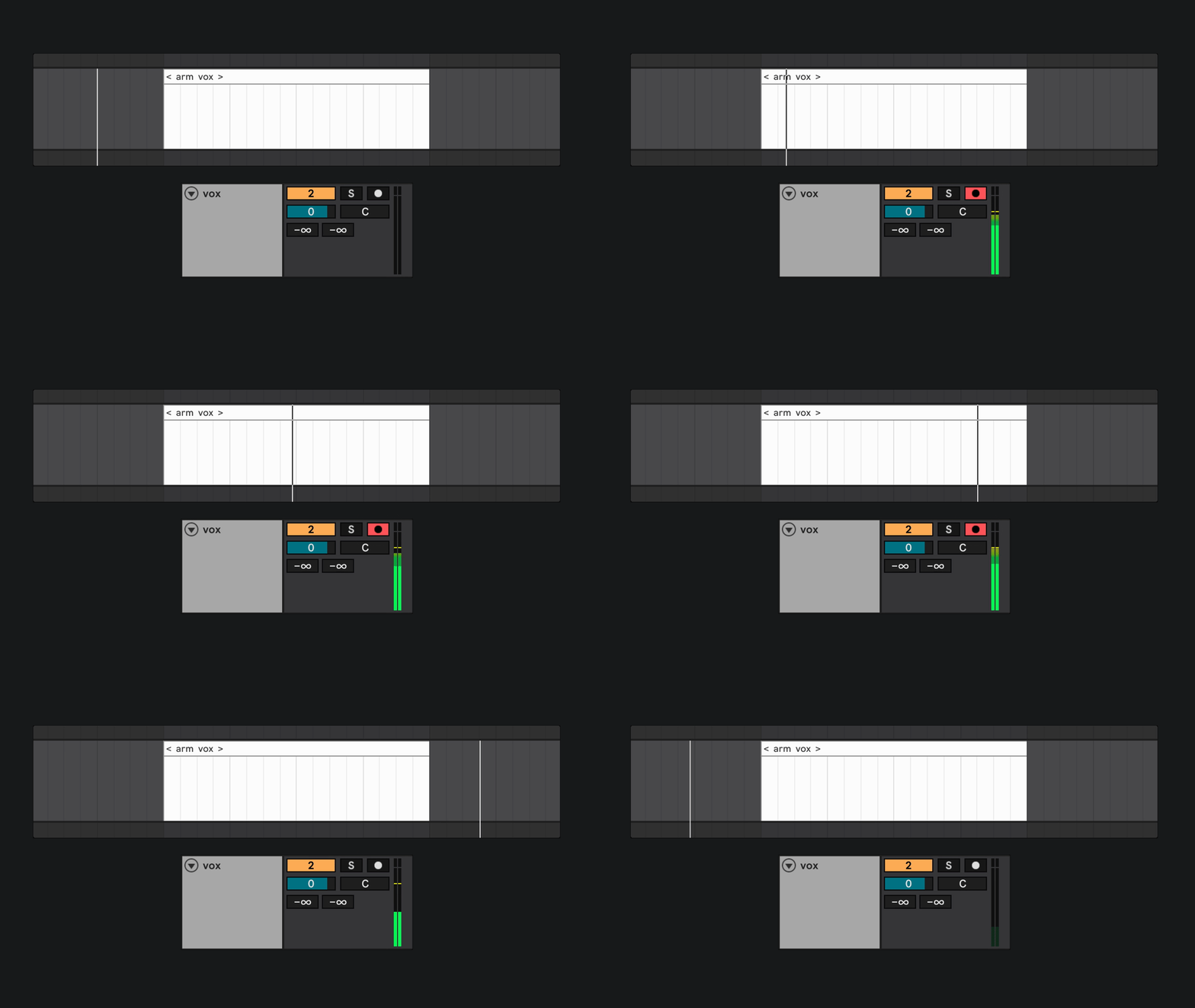
At the core of everything are “Instructions”: combinations of words that perform specific actions in your Live Set.
Above, you can see the clip < arm vox > arming the track called “vox” for its duration. It can be that easy.
But CSAL can do much more than just arm tracks…
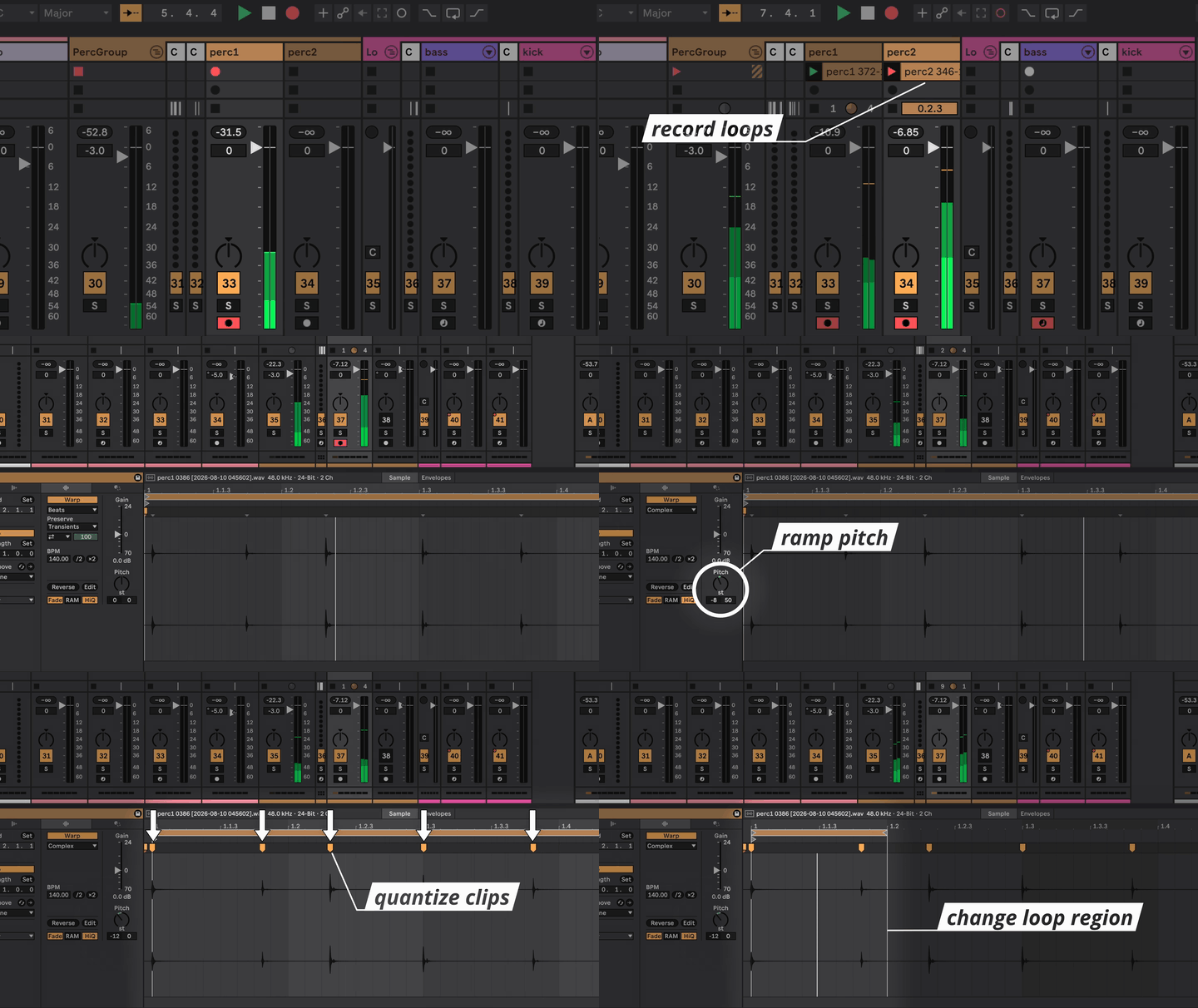
Instruction Clips can be used in both Session View and Arrangement View.
This means that regardless of how you’re currently using Live, CSAL can be easily added to your existing Live Set and immediately begin to expand its capabilities. There’s no need to start from scratch.
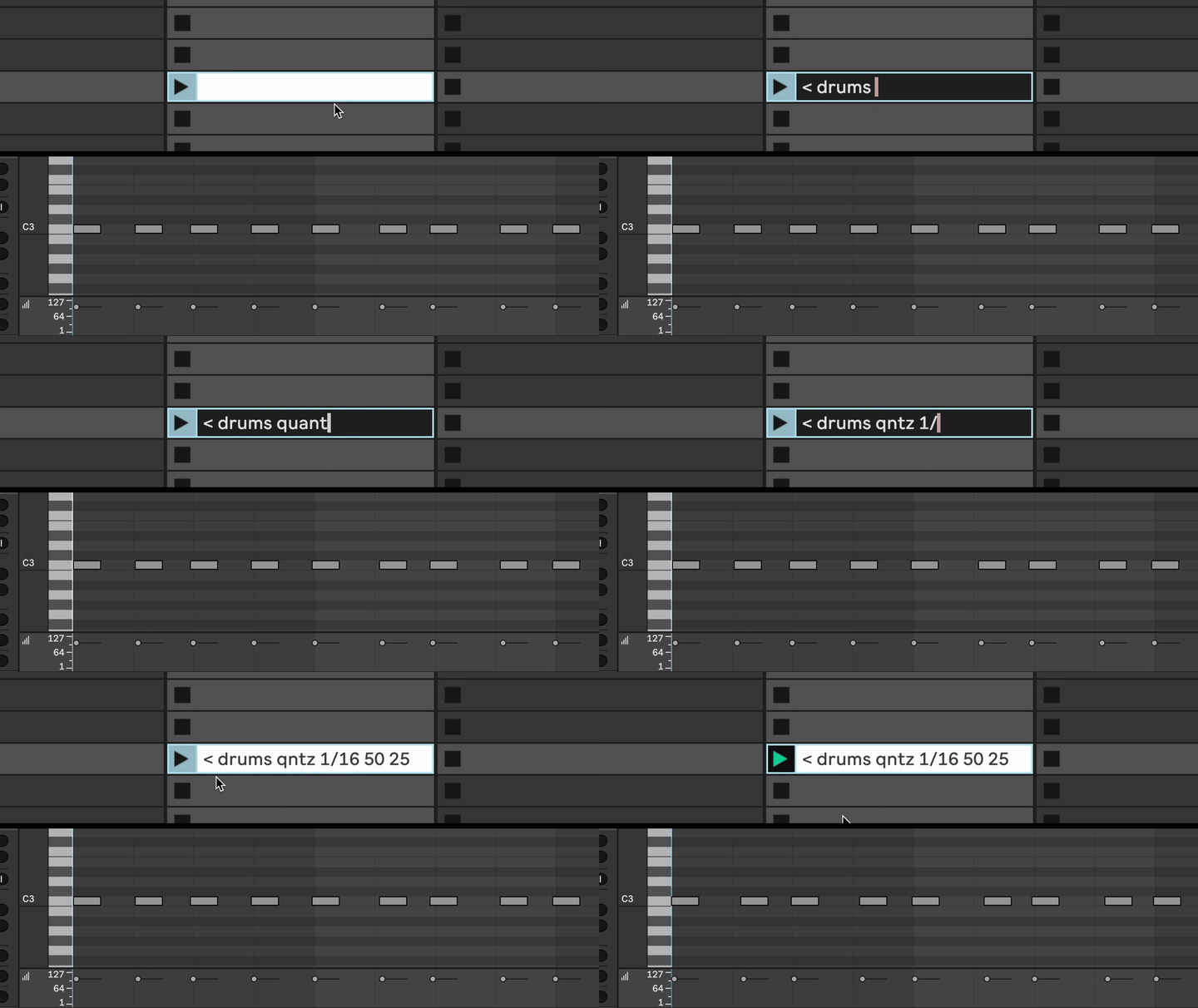
Switching active Instruments and Effect Racks across your whole live set has never been easier. Stop wasting time automating the Chain Selector or the On/Off buttons on all your devices—just create an Instruction Clip for each song and let CSAL do the rest.
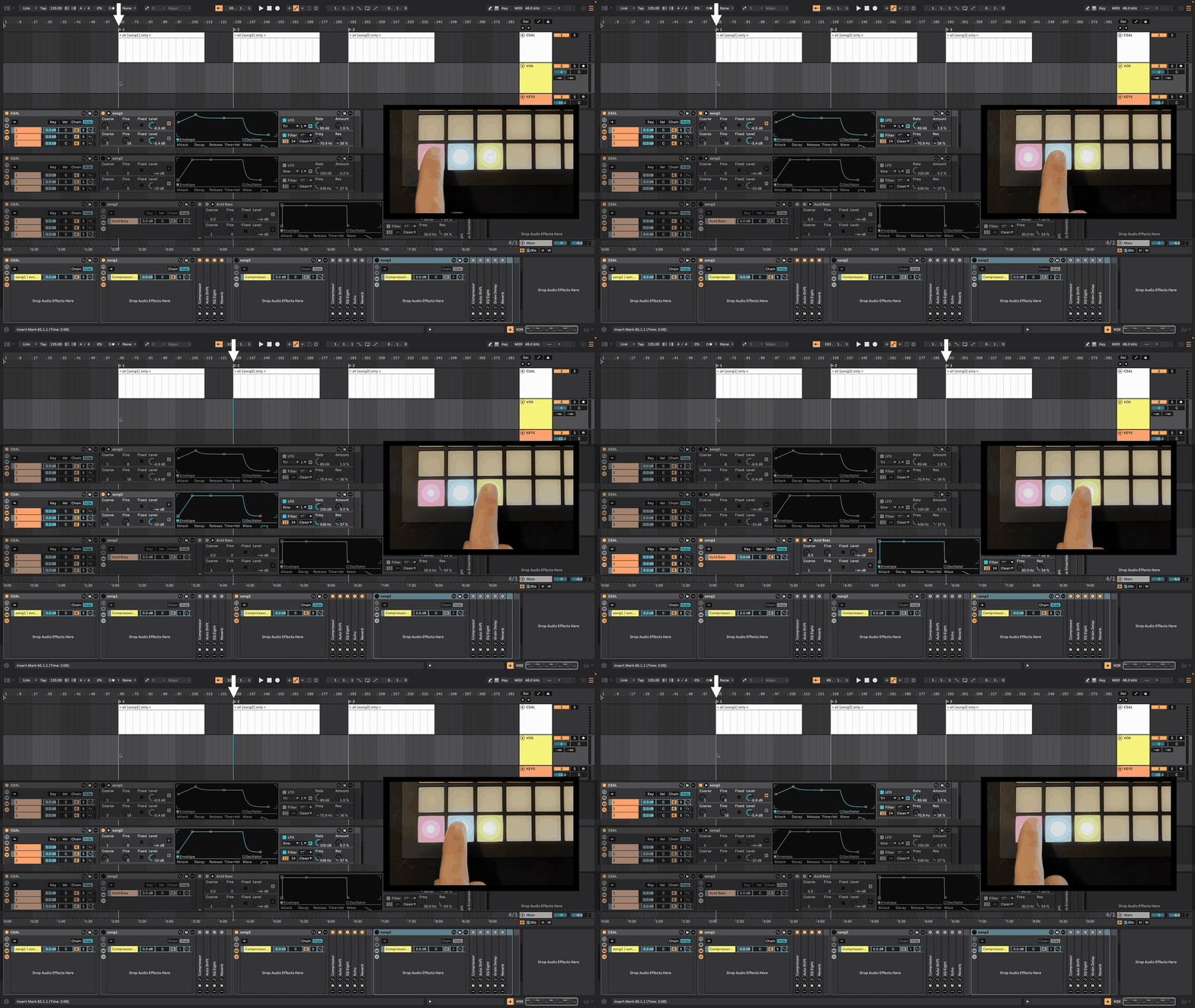
CSAL’s Console Log shows you a history of which Actions have been triggered and when—either in Simplified or Detailed timecode mode.
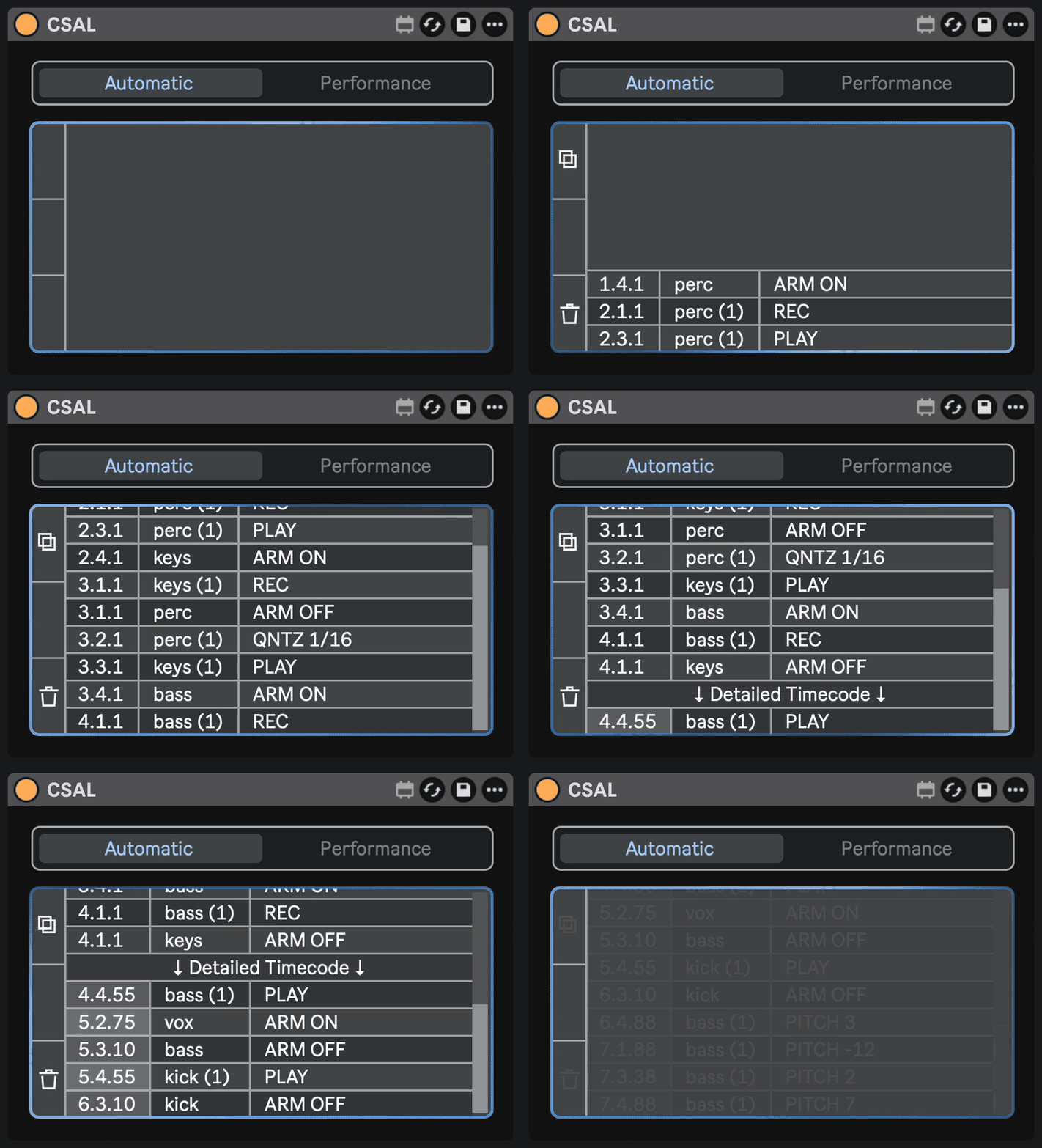
Is your Live Set already pushing up against the limits of your computer’s CPU? Are you worried about adding an extra Plugin that does stuff in the background?
You can pause all backround scanning by putting CSAL into Performance Mode. Refresh the device once before the start of your show and all of the Instructions in your whole Live Set will be calculated in advance. This means your computer is still free to focus all of its computing power onto your excessive number of Spectral Reverbs ;)
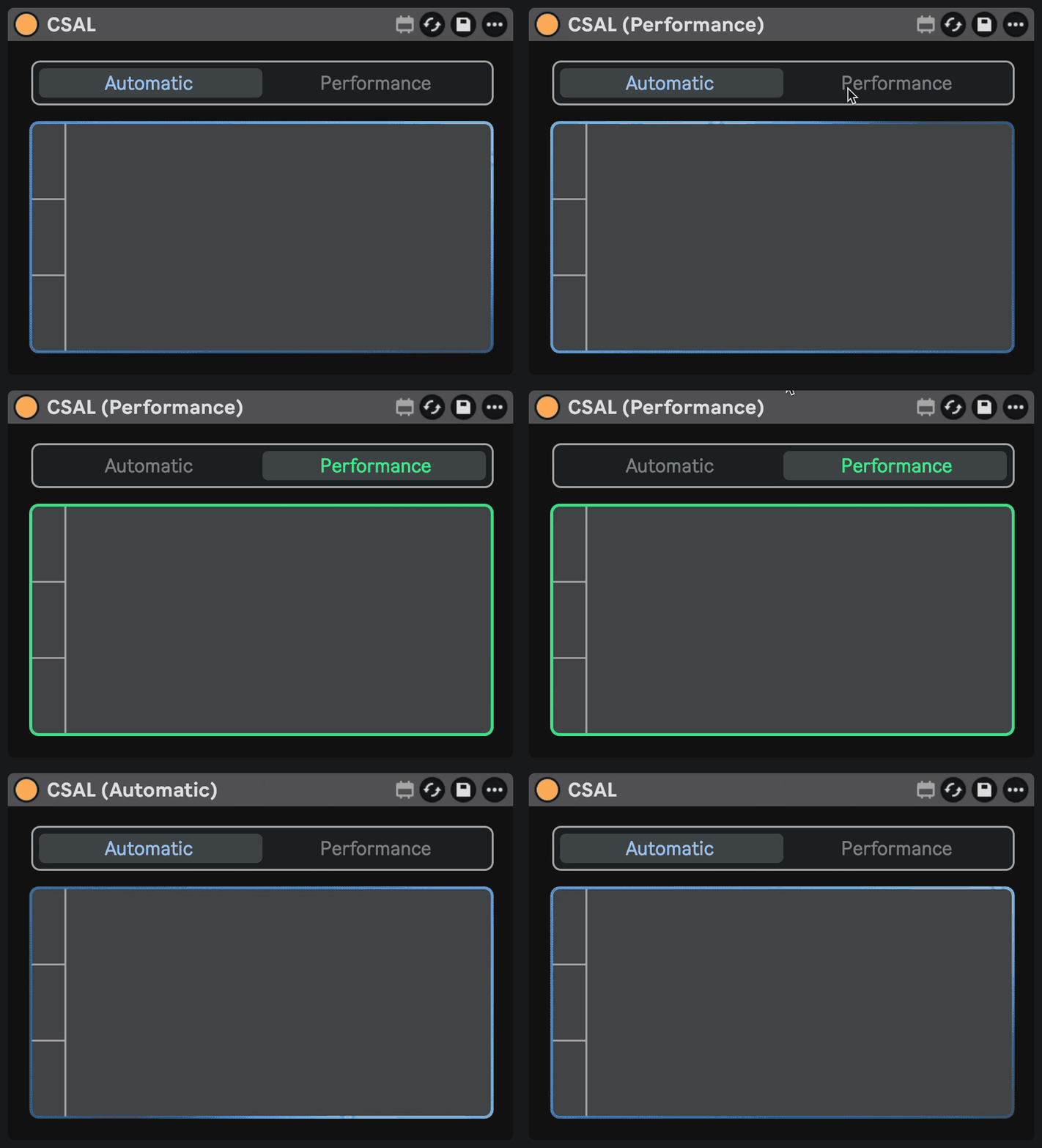
CSAL Remote
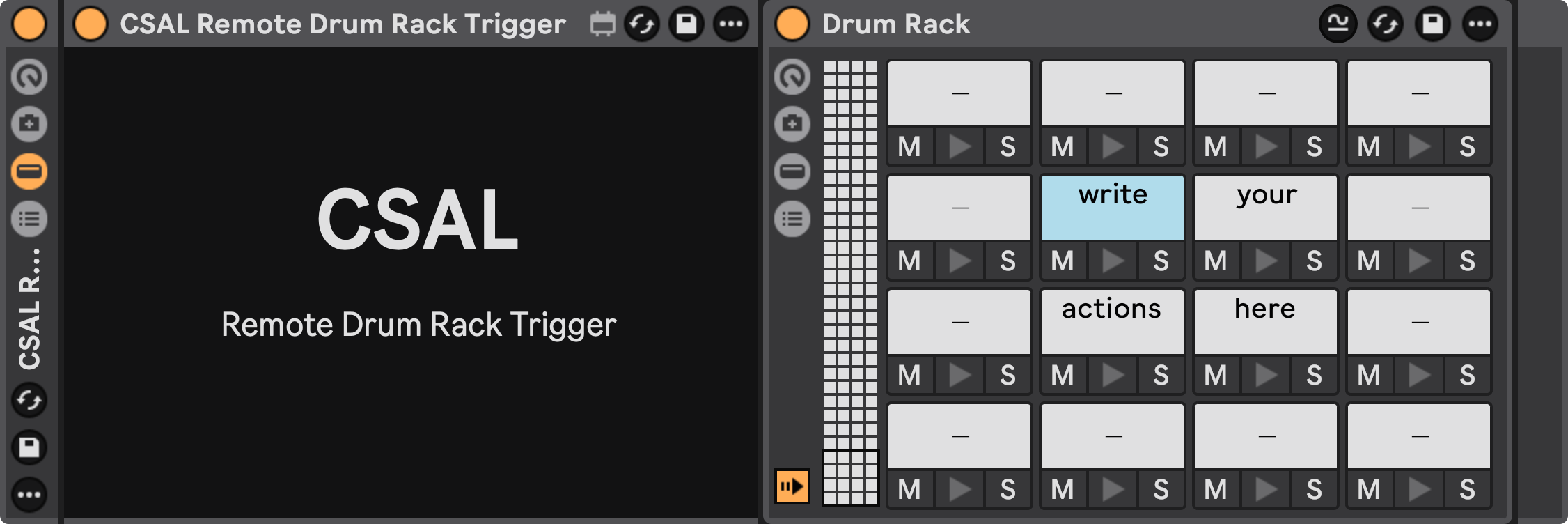
CSAL is even developer-friendly! You can design your own custom Max for Live devices and program them to communicate with CSAL via [s]/[r] objects.
There are already some off-the-shelf external devices available for free download, such as CSAL Remote Pop-Up and CSAL Remote Drum Rack Trigger!
CSAL was designed for the pressure of live performance. It's been put through all kinds of real-life tests, as well as dozens of hours of automated stress-testing, optimizing each action on the millisecond-level to ensure that it will work every single time.
And the best part is, CSAL runs locally; no AI, no subscription, and with such unbelievable CPU efficiency that you'll forget it's not a native part of Ableton. This lets you keep your focus on your music, where it belongs.
“CSAL has become an essential part of my live performance setup. It’s incredibly intuitive, versatile, and opens up so many creative possibilities in real time. Once you start incorporating it into your performances, it’s hard to imagine going back!”
— Natalie Tenenbaum | Pianist, Composer
“I’ve been using Ableton Live in the studio and on stage since version 5, so I know its capabilities and limitations pretty well. CSAL brings something genuinely new to Live. It opens up possibilities I hadn’t even considered before.
I’ve already used CSAL successfully in several projects and live shows, and to be honest, it would be hard to go back now! It has fundamentally changed the way I think about using Ableton Live, especially for live looping and performance.”
— Lauri Wuolio (a.k.a. Kumea Sound, Atonauer)
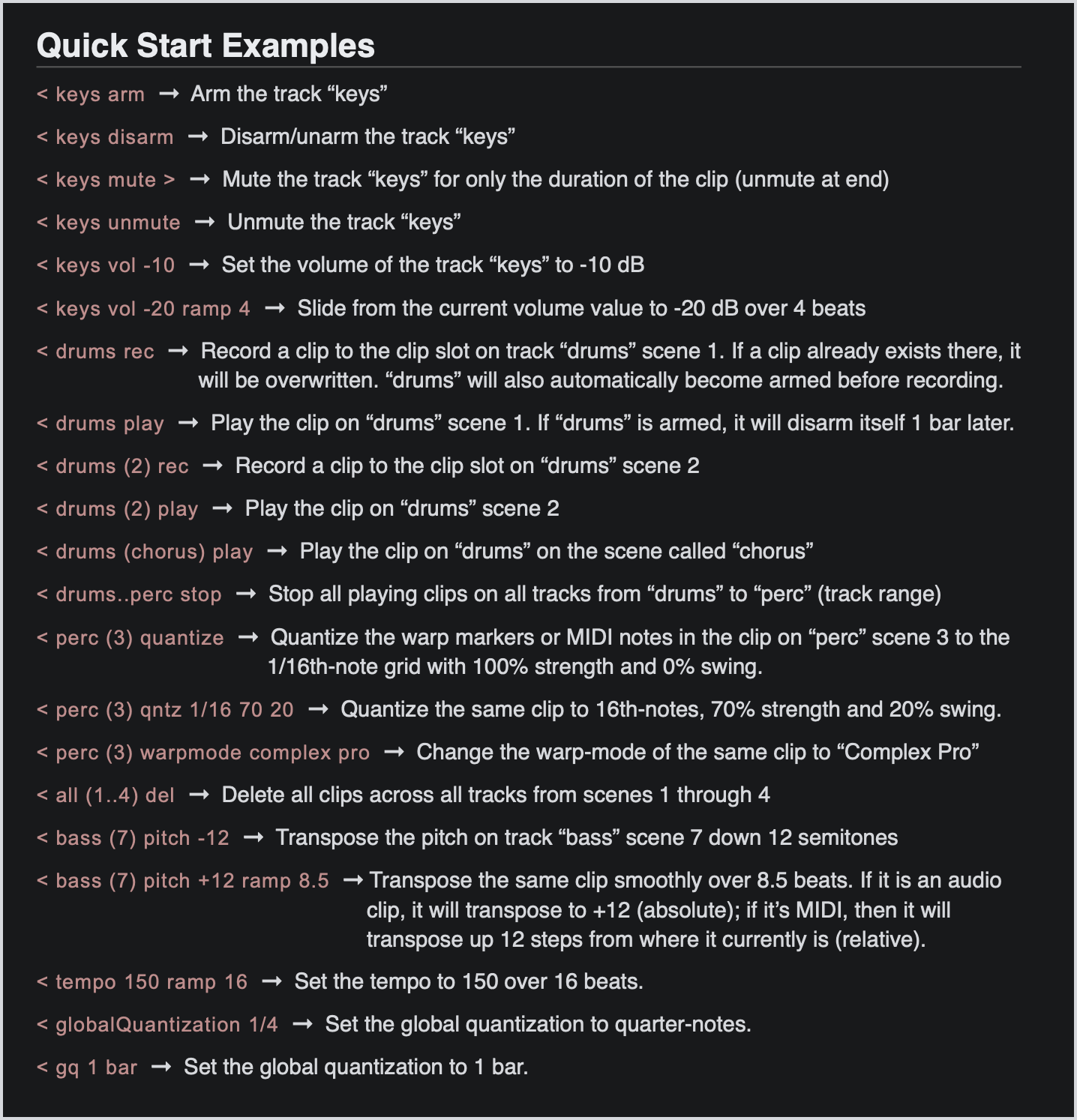
Learn to use CSAL
FAQ
-
CSAL requires Live 12.2 or later!
This is because CSAL uses Max 9, and older versions of Live were still using Max 8. I apologize for the inconvience, but I also highly recommend upgrading to Live 12.2, as I find it to be the most stable and capable version of Live they have ever released (and I promise they’re not paying me to say that). -
Yes. CSAL requires Max for Live (9+), which is only included in the full Ableton Suite (12.2 or later).
-
Ableton just announced Live 13 a few days after the release of CSAL. Great timing! /s
At this time, I cannot yet officially confirm full support, but based on reading the release notes for the Live 13 Beta, I don’t have any reason to belive that CSAL will behave any differently.
Live 13 will still use Max 9.2, which I have already tested successfully on Live 12. They also haven’t announced any chances to the Live API/LOM, which has always stayed relatively consistent between major version updates in the past.
The only thing I expect to change is that there might be some opportunities to add cool new Actions to CSAL’s vocabulary.
Once I can confirm official support, I will update this text.
Last updated: Nov. 12, 2026
-
Uhm, apparently yes?! I don’t own a Push 3, so I didn’t design CSAL with Standalone Mode in mind, and I never expected it to work at all… But I’m currently working with an Ableton Certified Trainer to test it, and so far, we haven’t encountered anything that doesn’t work! Even Instruction Clips in arrangement view seem to work normally.
We’re still working on testing it and finding any possible edge cases that don’t work the same as in Live (or at all), so for the time being, I would say that Push 3 Standalone is not officially supported (yet).
I will keep this text updated as we learn more.
Last updated: Nov. 8, 2026
-
If your computer can run Ableton Live, then it can run CSAL.
CSAL adds essentially zero CPU overhead, so if your computer can handle your Live Set at your chosen buffer size, then adding CSAL won’t change anything.
Some extreme CSAL Actions can cause Live to appear to lag for brief moments (ex: recording, playing, or deleting 50+ clips at the same time). This appears to be a visual lag in Live’s UI, and is usually completely harmless—though if you eventually push it far enough, you might encounter timing inconsistencies.
All CSAL Actions have been tested rigerously in extreme conditions up to 300 BPM, which is well above normal use cases.
Still, for especially large Live Sets, as well as for all Live Sets during live performances, I recommend keeping CSAL in Performance Mode; this disables automatic background scanning, which is by far the most compute-intensive thing it is ever doing at any given time. -
I certainly don’t think so! I worked very hard to make CSAL easy and intuitive.
That being said, this is not a “one-dial plugin” that claims to make your vocals sound better (or whatever other snake oil crap people are trying to sell these days).
CSAL might require a bit of time to learn—though I would say the basics can be learned in about 10 minutes.
Check out this video to get started! -
Yes! CSAL has a [receive] object in it that accepts Remote Instructions from other Max for Live devices.
-
It’s true! CSAL does resemble ClyphX Pro, and without a doubt, ClyphX Pro can be a powerful tool for controlling Live. For me personally, ClyphX Pro was a fundamental part of my Live setup for about 5 years, and I still highly recommend it to anybody looking for all the features it offers.
So then… why build CSAL?
A few main reasons:
1. ClyphX Pro is hard to learn. For people who don’t know how to code, or don’t enjoy mixing coding into their creative projects, ClyphX Pro can be overwhelming and confusing—at least in my experience teaching it in private lessons for nearly half a decade.
I built CSAL to offer people a more intuitive, flexible, and musicial alternative—with almost all of the same functionality, and in some cases even more.
2. ClyphX Pro is hard to use. Even once you understand how it works, you still spend quite a lot of time doing tedious and monatonous tasks. There are also lots of ways to mess things up without noticing, resulting in bugs that can be difficult to track down. I can’t tell you how often I wasted time looking for a mistake in my code that ended up being a simple flipped …”track1”, ”track2”… vs …”track1,” “track2”… or something similarly overlookable.
In contrast, I designed CSAL to resemble natural language as much as possible. Quotes are only required if your track or scene names contain spaces, and commas aren’t even necessary. You can even decide for yourself if you want to write Actions before Targets, or Targets before Actions. And the best part: if you mess something up, CSAL will immediately flash the problematic clip red and black so you can address the typo immediately.
Additionally, ClyphX Pro doesn’t have any built-in “lookahead”. For transport actions—like recording and playing clips in session view—this means that you need to launch ClyphX clips before the quantum barline, and you’re responsible for controlling that timing. In Session View, this means giving your ClyphX clips no launch quantization, and in Arrangement View, this means triggering the actions slightly before barlines, which is just annoying and visually ugly.
CSAL, on the other hand, does this all for you in the background. Your Instruction Clips can be set to play directly on the barlines where their Actions should take effect, and CSAL looks into the future to make sure everything works as it should.
This is what I mean when I say that CSAL is more musical.
3. ClyphX Pro can’t trigger actions out of Arrangement clips.
CSAL can. This means you don’t need to use a billion locators, and you can easily move all the clips around within the timeline, or copy them to a different Live Set without re-doing them one by one.
—
Overall, both tools will take you much further than Ableton Live on its own. And if you’re already really deep into ClyphX Pro, I doubt that switching to CSAL is worth the headache of having to rebuild everything.
But for those of you who might be on the fence between the two: if you’re someone who wants to spend less time programming and more time writing and performing your music, I have to recommend CSAL. … But… I might be a bit biased ;) -
Absolutely not.
CSAL runs locally and deterministically. If your instructions work once, they will work every time.
-
“Wouldn’t CSAL be better if it used AI to intepret the Clip Instructions? With AI, I could write entirely in normal english without any grammar rules!”
Well… Yes, that would be possible. And there are other Plugins that give you access to Live’s API via an AI-powered interface.
But the problem with AI is that it is inherantly non-deterministic. An instruction like, “Hey CSAL, arm this track for me and record a loop 4 beats later” might work as you expect it to 99% of the time, but when you’re standing on stage and putting your full trust into your Live Set… 99% just isn’t good enough.
CSAL is 100% deterministic. It has gone through countless pressure-tests that guarantee its accuracy down to the millisecond-level, ensuring that if it works once, it will work every time.***
***… Of course, no computer can ever truly have 100.0% reliability, but CSAL is designed to be just as reliable as Ableton Live itself. This means that its inevitable slight timing inconsistencies are well within the margins of even the most extreme use, so you can feel safe knowing that when you go on stage, CSAL will perform just as it did in the practice room. -
Short answer: No.*
Long answer: *No, but… At the time I'm writing this in early November of 2026—given all of the heat around this topic—I think it's only fair to talk a bit about how CSAL was made.
I started working on CSAL before AI could even reliably spit out any usable code at all. The first and second working prototypes (which were both used in numerous on-stage performances) were programmed by me alone. I am not a professional programmer by any means (I’m primarily a musician), but I certainly know enough to get by—especially in the context of the Max for Live / LOM environment, with which I’ve been working extensively for a long time.
Once Claude started getting really good at coding—around the beginning of 2026—I started using it to improve the capability and reliability of CSAL beyond what I could do on my own in any reasonable amount of time. In the end, in order for it to be truly useful to real musicians, it has to be really really good, and using Claude Code was the only way for me to accomplish that.
Before AI-assisted coding, building something like CSAL would’ve required a team of engineers—now, in a context like this, it’s possible that a single person working from home can achieve the same (or similar) quality results. This is a genuine paradigm shift for people like me who have big ideas, but don't have the money to build them the traditional way.
This is not an endorsement of AI coding tools—I see the current situation very critically and am mostly on team “fuck AI”. I am critical of these AI companies and the immense power they have over the entire world. I am critical of the excessive energy needed to train the frontier models. I am critical of the simplistic and reckless mindset that many AI-users have when it comes to releasing their slopware. And maybe most of all, I am critical of how the data used to train these models was acquired.
But I also don't see the situation as black and white. I use AI for certain tasks in the same way that people who are in favor of proper environmental regulations still often make the practical decision to drive a car to work or travel by plane more than they should.
And I draw certain lines that I do not cross. For example, I have a hard rule against using AI to generate any media. This means no AI-photos, videos, or graphics. To me, there is a fundamental difference between using AI to generate media vs using it to work with information.
But still, to anyone who takes a strict moral stance against any use of AI: I accept your critique.Back to the main question: No, CSAL is not “vibe-coded.”
To me, "vibe coding" implies a lack of understanding of the deeper inner workings of the software. It implies gestural prompts like, "Please make me a really cool Ableton plugin" and, "It's not working, can you fix the bugs?" This is not how CSAL was built.
I prefer the term "AI-assisted coding". I maintain knowledge over every step of the process, as well as an understanding of the complete inner workings of the software. When something isn't working the way I expect it to, I know the first place to start hunting for bugs; when I want to build in a new feature, I (usually) know how to avoid breaking existing features (lol); when I run tests, I determine what constitutes "passing".
None of the fundamental ideas, the visual concepts, the interaction design, nor the CSAL Language Model were made by AI. Additionally, every single word of the 75-page User Guide, and every single graphic in it was written and drawn by me with absolutely no AI-assistance whatsoever.
From the prototyping, through the development, all the way to scripting, filming, and editing of tutorial videos, I estimate that I spent at least 1,000 hours of my personal time working on this project (and I think that estimate is extremely conservative).
While AI certainly assisted me in the coding process, I take full responsibility and accountability for the end result. It is a work of love and dedication, built on the shoulders of nearly 15 years of Ableton Live experience and half a decade of obsessive work in musical interaction-design.
I hope you enjoy it.
-
Yes. We’re still on v1.0, but all future minor version updates will come free to everyone who has ever purchased a copy.
I cannot rule out that a theoretical major version update might cost something at some point in the future, but there are currently no plans for that.
Small changes, bug fixes, etc. will be available to everyone. -
Behind the curtain, CSAL is a very, very complex tool. Although I’ve spent many years on it, and countless hours checking every tiny little detail, like any software, it’s always possible that there are bugs hiding in the cracks.
I rely on user feedback to find and fix these issues. If you believe you found something, please write me an email about it. Do your best to give me as much detail about the situation as you can—even attaching the Live Set in question, if you don’t mind sharing it.
If it does turn out that you found a real bug and your tip helps me fix it, I will completely refund the cost of your purchase. -
This is a known bug, and unfortunately, it’s not fixable as of the time I’m writing this.
Here’s what we know so far:
CSAL doesn’t actually add any noticable increase in RAM usage. When you first boot Live and load CSAL, you’ll see that the RAM use is actually entirely consistent with normal usage of Live.
However, after leaving Live+CSAL running for many hours (12+ hours), you may start to notice that Live is reporting to use more RAM than normal. The longer Live stays open with CSAL running, the higher the RAM usage report gets.
The cause of the problem has been found: a teeny tiny memory leak in the bridge between Max for Live’s JS engine and Live’s API.
On August 20th, 2026, Cycling ‘74 (the company behind Max, also owned by Ableton) confirmed the bug is on their end, and apparently it’s even slightly more severe on Windows OS.
It likely went unnoticed until now because the leak is extremely small. Every time the JS engine polls Live’s API, only a few bytes leak. In “normal” use cases, this never adds up to much.
CSAL exposed the problem because of the sheer number of API polls it’s doing while in Automatic Mode. It’s continuously scanning the entire Live Set—which can eventually add up to a noticable leak after a long period of time.
Although Cycling ‘74 support cannot yet confirm when exactly the bug will be fixed, they did confirm that it was reproducable and that it was passed on to the engineers.
Current workarounds:
1. Restart Live about once per day while using CSAL in Automatic Mode.
2. When leaving Live open for long periods of inactivity, set CSAL to Performance Mode (which stops the continuous background polling). In P Mode, the leak will never amount to anything noticable.
As soon as the bug is fixed, I will pass the info on to all CSAL users. The CSAL device itself shouldn’t require any updates for the fix to take effect.